The flagship
Your customer's account, with the car's full history.
The portal stops the check-up calls. Your customer sees the stage the job is at, approves the estimate from a phone and downloads the documents — without interrupting anyone in the workshop.
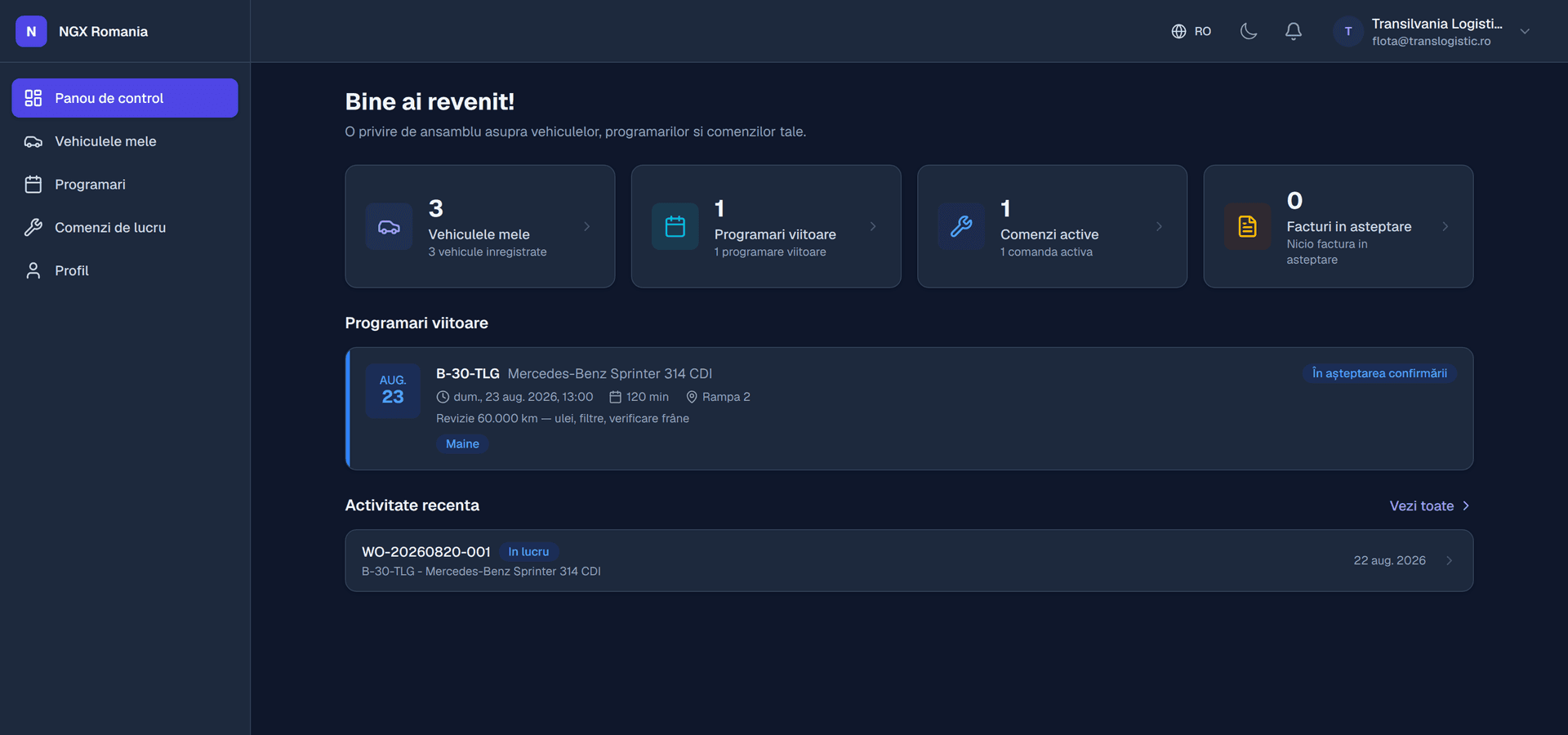
What the customer sees
All their data, in their own account
- My vehicles
Every car they own, with technical details, documents and service statistics.
- Jobs in progress
The current state of each order, with photos from the workshop.
- Estimates to approve
Parts and labour itemised, with approve and decline buttons.
- Documents
Job sheets, estimates and invoices, downloadable at any time.
- Messages with the workshop
The conversation stays attached to the job instead of drifting off into chat apps.
- Booking requests
The customer asks, reception confirms and places it in the calendar.
How the customer gets in
Four steps, once
- 01
You invite them
From the customer record, with their email address.
- 02
They get the invitation
An email with a link to set a password.
- 03
They sign in
With a password or, if they prefer, a magic link sent by email.
- 04
They use the portal
From a phone, with nothing to install.
The effect on the workshop
Fewer interruptions, faster decisions
A mid-sized workshop takes dozens of calls a day asking the same question: is the car ready? Each one stops someone working, usually the receptionist, exactly when a customer is standing in front of them.
When the customer can see the state of the job and the photos themselves, the calls drop. And when the estimate is approved from a phone, the job no longer sits idle until you manage to catch someone free.
- Faster approval The estimate arrives instantly, not when you get a chance to call.
- The agreement is provable With date and time, in the work order history.
- Automatic notifications Estimate to approve, job completed, car ready for collection.
Frequently asked questions
What does the customer see in the portal?
Their vehicles, work orders with current status, the estimate awaiting approval, documents to download, service history and messages with the workshop. It is their account, with their data, so they do not have to call and ask how the car is doing.
How does a customer get access?
You invite them from the app and they receive an email link to set a password. They can also sign in without a password, through a magic link sent by email, if you would rather not ask them to remember another one.
Can customers request an appointment from the portal?
Yes. The request reaches reception, who confirms it and places it in the calendar on the right bay. The customer sees the confirmation in the portal, with no phone calls exchanged.
How does the customer approve an estimate?
When the order moves to awaiting customer, the estimated total goes out to them. They see it in the portal or through the link they received, with parts and labour itemised, and approve or decline. The approval is recorded with date and time.
See the portal from the customer's side
In the demo you can sign in both as the workshop and as the customer, to see exactly what reaches them.